How to Build Solar-Powered CCTV for Remote Sites
Plan a remote solar CCTV system from site survey to acceptance, covering recording, backhaul, power, cabling, protection and outage recovery.
By Maxsol Team

To build a solar-powered CCTV system for remote areas, first confirm that the site has suitable camera views, dependable solar exposure, safe equipment mounting and a workable communications path. Then select the recording architecture, calculate every continuous and intermittent load, size the solar power system with suitable design margins, and verify all voltage, PoE, cabling and environmental interfaces before installation.
Treat the CCTV, recorder, backhaul radio or modem, power conversion and solar equipment as separate subsystems. A product name or matching connector does not establish compatibility. A reliable deployment depends on documented power measurements, interface checks, controlled commissioning and clear acceptance evidence.
Survey coverage and remote-site constraints
A remote CCTV survey must answer two questions: can the required scene be monitored, and can the equipment operate there continuously enough to meet the project objective?
Begin with the security requirement rather than the equipment list. Identify what the camera must show, such as a gate, equipment compound, access road or perimeter. Define whether the operator needs general situational awareness, person recognition, vehicle identification or another specific outcome. This determines camera position, lens selection, mounting height, lighting and recording quality.
Record the following during the survey:
- Required camera views and likely blind spots
- Day and night lighting conditions
- Potential glare, headlight exposure and backlighting
- Trees, buildings or terrain that may shade the solar panel
- Seasonal vegetation growth that could block a camera or wireless path
- Pole, wall or structure condition
- Distance between the panel, battery enclosure, camera and network equipment
- Possible cable routes and entry points
- Flooding, standing water, dust, insects, heat, humidity and wind exposure
- Risk of theft, tampering or accidental impact
- Mobile network coverage, where cellular backhaul is being considered
- Clear line of sight and mounting alignment for a wireless bridge
- Safe access for installation and future maintenance
For Malaysian outdoor sites, heavy rain, high humidity, heat inside sealed enclosures and rapid vegetation growth can materially affect the design. Do not assume an enclosure remains cool simply because it is weather-resistant. Direct sun and power conversion losses can raise its internal temperature.
Use go/no-go checks before specifying equipment
A go/no-go decision prevents a technically weak location from progressing to procurement.
| Survey item | Go condition | No-go or redesign condition |
|---|---|---|
| Camera view | Required scene is visible by day and night | Critical detail is blocked, too distant or affected by uncontrollable glare |
| Solar exposure | Panel location has practical, durable exposure | Persistent shading cannot be removed or avoided |
| Mounting | Structure can safely support the selected equipment | Pole or surface is unstable, inaccessible or unsuitable |
| Wireless path | Fresnel clearance and alignment are practical | Terrain, vegetation or structures obstruct the path |
| Cellular option | Service is stable enough at the proposed antenna position | Coverage is intermittent or unsuitable for required traffic |
| Equipment security | Enclosure and cables can be protected | Battery, recorder or wiring remains easily accessible to tampering |
| Maintenance | Technicians can safely inspect and service the system | Routine access would be unsafe or impractical |
| Power feasibility | Expected energy demand can be supported within site constraints | Required panel or battery capacity cannot be accommodated |
If one route fails, consider moving the camera, using a local recorder, changing the backhaul method or separating the solar panel from the camera pole. Do not proceed on the assumption that a larger antenna, battery or panel will correct an unsuitable site.
Choose recording and backhaul architecture
The recording and backhaul design should match the purpose of the system and the consequences of a communications outage. Remote CCTV generally uses local recording, wireless backhaul, cellular backhaul or a combination of these.
| Architecture | Main advantage | Main limitation | Suitable use |
|---|---|---|---|
| Local recording only | Low communications load and continued recording when the link is down | No dependable live remote view during an outage | Evidence collection where immediate response is not required |
| Wireless point-to-point backhaul | Can carry video to an existing network without recurring mobile data dependence | Requires suitable line of sight, alignment and interference assessment | Sites within practical radio reach of a network point |
| Cellular backhaul | Can connect sites where no local network endpoint exists | Coverage, data usage, latency and network variability must be assessed | Dispersed sites with acceptable mobile service |
| Local recording plus backhaul | Preserves footage locally while supporting remote monitoring | Higher power, configuration and maintenance requirements | Sites where both evidence retention and remote visibility matter |
Local recording
Local recording reduces dependence on an external link. Recording may be provided by a camera memory card or a separate recorder, depending on the selected surveillance design. Confirm storage capacity, write endurance, overwrite behaviour, time synchronisation and how footage will be retrieved.
A local recorder also adds power demand. Include its storage device, cooling needs and start-up behaviour in the budget. The recorder and cameras are not implied to be included with any linked Maxsol power or networking component.
Wireless backhaul
A point-to-point wireless bridge may connect the remote camera site to a building, guard post or network cabinet. This approach requires a proper path survey rather than relying on a range label.
For example, the Maxsol CPE295 5.8GHz wireless CPE documents 5.8GHz operation, a 2x2 14dBi directional MIMO antenna, one Gigabit LAN port, IEEE 802.3af/at or 9–48V DC power support, and 6.5W full-load consumption. Product range and wireless rate labels do not guarantee site distance or application throughput. Verify line of sight, Fresnel clearance, interference, mounting rigidity, channel planning and applicable Malaysian radio requirements.
If the bridge carries several video streams, estimate traffic at expected rather than maximum camera bitrates. Leave capacity for protocol overhead, management access and changing scene complexity.
Cellular backhaul
For cellular connectivity, confirm service at the final antenna height and position. A handset reading at ground level is not adequate acceptance evidence. Test stability over time and evaluate upload performance because remote viewing sends video from the site towards the monitoring location.
The power budget must include the modem, router and any external network equipment. Data plans, remote access methods, private addressing, VPN requirements and cybersecurity controls also need separate confirmation.
Where mobile bandwidth is limited, use local recording and transmit alerts, health information or selected streams instead of treating cellular service as the only copy of recorded evidence.
Establish the complete power budget
A remote solar CCTV system must be sized from its total daily energy demand, not only the camera’s rated wattage. Count every device operating from the battery, including conversion losses and loads that run only at night.
Typical loads include:
- Cameras in day and night modes
- Infrared illumination or separate lighting
- Local recorder and storage device
- PoE switch
- Wireless CPE or cellular router
- DC converters and PoE injectors
- Enclosure heater, fan or ventilation equipment, where used
- Control relays, sensors and monitoring devices
- Standby consumption
- Cable and conversion losses
Use the highest credible operating mode for design. A camera may consume more power when its infrared LEDs, heater, motorised lens or pan-tilt mechanism is active. Obtain the relevant figures from the current camera datasheet and confirm them through measurement where practical.
A simple hypothetical load schedule
The following is a hypothetical assumption for explaining the method. It is not measured performance for any Maxsol product or a guaranteed system runtime.
| Load | Assumed power | Assumed operation | Daily energy |
|---|---|---|---|
| Two cameras | 8W each | 24 hours | 384Wh |
| Local recorder | 10W | 24 hours | 240Wh |
| Wireless radio | 6.5W | 24 hours | 156Wh |
| Conversion and other allowance | 4W | 24 hours | 96Wh |
| Hypothetical total | 876Wh/day |
This simplified example shows why adding device wattages is not enough. A continuous load consumes 24 times its wattage each day, and night-mode demand may alter the result. The final design must also account for system voltage, usable battery energy, charging conditions, cable losses, conversion efficiency and the required autonomy during poor solar conditions.
Rather than relying on a general rule of thumb, follow the calculations and design checks in the off-grid solar sizing guide for CCTV systems. Do not treat nominal battery watt-hours as usable delivered energy, and do not promise universal autonomy or 24/7 operation without a site-specific energy model.
Specify solar storage and power interfaces
Select the solar system only after the power budget and required autonomy have been established. The main components are the PV panel, charge controller, battery, output protection and any DC-to-DC or DC-to-PoE conversion equipment.
As one selection example, the Maxsol CS12060 120W and 60Ah solar power system documents a 120W monocrystalline panel, 12.8V 60Ah 768Wh LiFePO4 battery, MPPT controller and three DC12V outputs. RS485 is optional. These nominal figures do not establish usable energy, autonomy or compatibility with a particular CCTV load.
Before specifying any solar kit, verify the current datasheet and supplied configuration for:
- Controller PV voltage, current and power limits
- Panel open-circuit voltage under relevant conditions
- Battery charging temperature limits
- Low-voltage disconnect and recovery settings
- Output current limits
- Fuse or circuit-breaker requirements
- Battery and load terminal sizes
- Cable polarity
- Monitoring interface availability
- Enclosure and environmental requirements
A battery can have sufficient nominal energy yet still be unsuitable if the output current, low-voltage cut-off, temperature limits or charging window do not match the installation.
Check every DC and PoE interface
Do not assume all equipment labelled “PoE” uses the same voltage or negotiation method. Confirm:
- Input voltage range of the converter or injector
- Output voltage under load
- Required power at the powered device
- Polarity and Ethernet pinout
- Passive or standards-based PoE requirements
- Cable length and voltage drop
- Continuous rather than peak converter rating
- Earthing and surge-protection arrangement
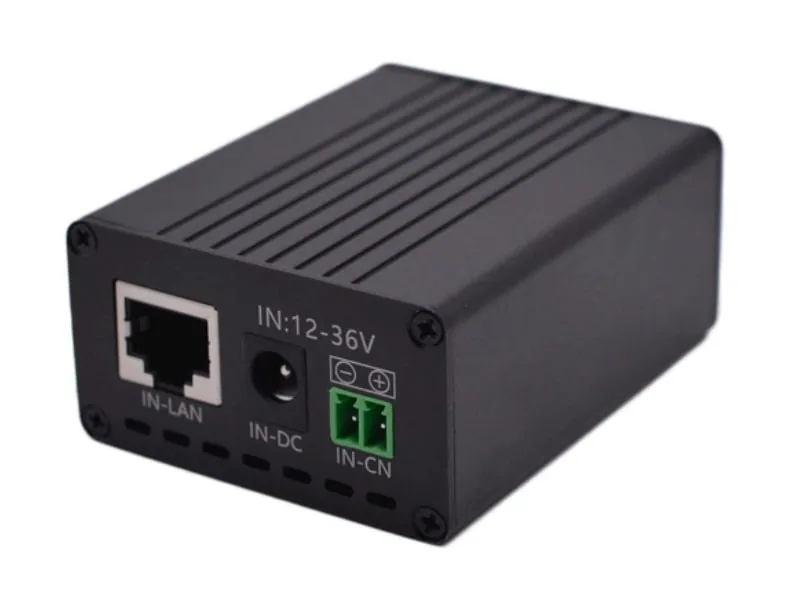
The Maxsol POE24V DC-to-PoE converter accepts 12–36V DC and provides an adjustable 12–57V PoE output, Gigabit Ethernet and an LCD voltage display. Its documented continuous load when converting 12V to 48V is no more than 30W. Up to 94% conversion efficiency is a maximum figure, not a guaranteed design value.
IEEE powered-device detection or negotiation is not established by these facts. Before connecting a camera, radio or other device, verify its voltage, polarity, pinout, protocol and power requirement. An Ethernet connector fitting physically does not prove electrical compatibility.
Plan mounting, cabling and protection
The physical installation must keep the solar panel exposed, the camera stable and the cable routes protected without making maintenance unnecessarily difficult.
Solar panel and equipment placement
Orient and tilt the panel according to the site design, mounting system and available solar exposure. Avoid locations where trees, poles, antennas or the camera itself will shade the panel. Allow for future vegetation growth, not only conditions on survey day.
Mount batteries and electronics in a protected enclosure. Avoid placing sensitive equipment where rainwater can run along a cable into a gland. Use drip loops, suitable cable glands and downward-facing entries where practical.
Keep the camera pole rigid enough to prevent image shake. A wireless bridge needs especially stable alignment; small movements can affect a directional radio path even if the camera image remains acceptable.
Cabling and voltage drop
Long DC cable runs can cause excessive voltage drop, particularly in lower-voltage systems. Calculate the drop from cable length, conductor size and actual current. Remember that the electrical circuit includes both outgoing and return conductors.
Where possible:
- Keep high-current battery cables short
- Use correctly sized conductors and terminals
- Protect cables from UV, abrasion, rodents and tampering
- Separate power and data cables where required
- Label both ends of every cable
- Use outdoor-rated Ethernet cable and compatible glands
- Maintain bend radius and strain relief
- Avoid unsupported connectors inside wet areas
For broader enclosure decisions involving PoE, battery, fibre and outdoor equipment layout, refer to the outdoor PoE switch box and power design guide.
Protection and maintainability
Protection should be coordinated across the panel, controller, battery, load outputs, Ethernet lines and any conductive mounting structure. The exact arrangement depends on the site and local installation requirements, so it should be designed by a suitably competent person.
Consider:
- Overcurrent protection close to energy sources
- DC-rated isolation
- Reverse-polarity prevention
- Surge protection for exposed power and data lines
- Earthing and bonding
- Lightning exposure
- Cable-entry sealing
- Condensation management
- Tamper-resistant fasteners and locked enclosures
- Safe battery access
- Space for testing without dismantling the complete system
Document fuse sizes, cable sizes, terminal assignments, IP addresses, radio settings and low-voltage thresholds. A clear cabinet diagram can reduce troubleshooting time during later site visits.
Commission night operation and outage recovery
Commissioning should prove the complete operating sequence, not merely show that each device powers on in daylight. Test the cameras, recording, communications and solar subsystem together under representative conditions.
Daytime commissioning
Start by recording baseline values:
- PV voltage and charging status
- Battery voltage and controller state
- Current or power drawn by each major load
- Converter input and output voltage
- Camera and recorder connectivity
- Local recording status
- Wireless signal and link stability, where applicable
- Cellular connection quality and remote access, where applicable
- Time synchronisation across all devices
Confirm that the camera view matches the approved survey image. Check focus, field of view, mounting stability and masking or privacy settings required by the project.
Night operation
Return after dark or conduct a controlled night test. Confirm:
- Infrared or low-light mode activates correctly
- Night power demand remains within the design assumption
- Faces, vehicles or other required targets are visible at the specified area
- Nearby surfaces do not cause excessive infrared reflection
- Insects, rain or vegetation do not dominate the image
- Recording continues at the intended settings
- The network remains stable while all night loads are active
Measure actual load rather than assuming that day and night consumption are identical. If actual demand exceeds the budget, correct the configuration or resize the power system before acceptance.
Test communications failure
Disconnect or disable the backhaul in a controlled manner. Verify what happens to:
- Local recording
- Event logs
- Alerts
- Time synchronisation
- Remote health reporting
- Automatic reconnection
- Footage retrieval after service returns
A system with local storage should continue recording according to its configured retention policy. Confirm this by retrieving footage created during the simulated outage.
Test low-voltage shutdown and recovery safely
Outage recovery must follow the battery and controller manufacturer’s approved procedure. Do not deeply discharge a battery merely to demonstrate autonomy.
Where the controller supports suitable test controls, verify:
- Loads disconnect at the configured protection point.
- Cameras, recorder and communications equipment shut down predictably.
- Charging resumes when adequate PV input returns.
- Load outputs recover according to the intended settings.
- Network equipment and cameras restart without manual intervention.
- Recording resumes and the correct time is restored.
- Repeated start-up does not create an unstable on-off cycle.
If the system cannot recover cleanly after low-voltage protection, consider controlled start-up sequencing or revised thresholds. These changes must remain within the documented requirements of the battery, controller and connected devices.
Collect acceptance evidence
A remote-site CCTV handover should include evidence that another technician or procurement reviewer can verify. A practical acceptance pack may contain:
- Final camera-view screenshots from day and night
- Photograph of panel orientation and unobstructed exposure
- Photographs of enclosures, labels, glands and cable routes
- Device inventory and serial numbers
- As-built wiring and network diagram
- Measured load data and design assumptions
- Battery and controller settings
- Recording retention configuration
- Wireless alignment and link records
- Cellular test results, if used
- Sample locally recorded footage
- Evidence of recording during a simulated backhaul outage
- Recovery test results
- Administrator credential handover procedure
- Maintenance schedule and inspection checklist
- List of unresolved limitations or exclusions
Acceptance criteria should be agreed before installation. “Camera online” is not enough if the requirement includes night identification, local evidence retention or automatic recovery after an energy shortage.
Common mistakes to avoid
The most frequent remote solar CCTV problems result from incomplete system integration rather than a single defective component.
Avoid these mistakes:
- Sizing from camera wattage alone
- Treating nominal battery capacity as fully usable energy
- Ignoring night-mode power consumption
- Depending on a wireless range label without a path survey
- Assuming cellular signal bars guarantee upload performance
- Buying PoE equipment without confirming voltage and protocol
- Omitting converter and cable losses
- Installing panels where vegetation will later create shade
- Sealing electronics inside an enclosure without considering heat and condensation
- Relying only on remote recording over an unstable link
- Skipping controlled communications and recovery tests
- Accepting the system without day and night evidence
- Combining separately selected products as though they were a tested bundle
A robust system is one whose loads, interfaces, environment and failure behaviour have all been checked. No individual panel, battery, converter or radio can compensate for an unverified overall design.
As a practical next step, compare the linked Maxsol selection examples against your required camera and switch port count, measured load, radio distance, power interfaces, site environment and management needs. Verify the latest datasheets and supplied configurations before treating the CS12060, POE24V or CPE295 as compatible parts of the same deployment.