Off-Grid Solar PoE Design for CCTV and Wireless
Plan a dependable off-grid PoE system for CCTV and wireless networks by matching voltage, power, backhaul, monitoring and restart behaviour.
By Maxsol Team

An off-grid PoE system for CCTV and wireless networks must be designed as one complete power-and-data system. Define which devices must remain online, total their simultaneous loads, match every input voltage, power both ends of any wireless backhaul, and test how the network behaves after a low-battery shutdown.
Continuous 24/7 availability should be treated as a design and commissioning objective, not assumed from a panel, battery or PoE switch rating. Actual continuity depends on energy use, weather, battery state, conversion losses, equipment behaviour and how effectively lower-priority loads can be disconnected.
Define network services and availability targets
Start by defining what the remote site must do before selecting hardware. “Four cameras and a wireless link” is only a device list; it does not explain which services are critical or what may be temporarily unavailable during low-energy conditions.
List each required service and its acceptable behaviour:
| Network service | Design question | Possible priority |
|---|---|---|
| Critical camera recording | Must it record continuously, including when the backhaul is unavailable? | Highest |
| Secondary camera recording | Can it be disabled during prolonged low battery? | Medium |
| Wireless backhaul | Is it required continuously, or only for scheduled uploads and live viewing? | High or medium |
| Remote management | Must alarms and battery data remain reachable? | High |
| Local storage | Can cameras continue recording locally during a link outage? | High |
| Auxiliary equipment | Can lighting, sensors or other loads be shed first? | Low |
The availability target should cover more than average runtime. Specify:
- which cameras must stay active;
- whether recording is local, central or both;
- how long a backhaul interruption may last;
- whether live viewing is continuously required;
- the permitted low-battery shutdown sequence;
- how the system should restart when charging resumes;
- whether an installer must visit after a complete discharge;
- what alarms or telemetry must be retained.
A sensible design separates recording availability from remote access availability. A failed radio link should not necessarily stop local camera recording, while a low-battery event should not cause every device to repeatedly reboot.
Draw the camera, radio and backhaul topology
A practical remote CCTV topology has two distinct locations, even when only one is solar-powered.
Remote camera site
The usual signal and power path is:
- Solar array feeds the charge controller.
- The controller charges the battery through the specified protection devices.
- The battery or regulated DC stage supplies the PoE switch.
- The PoE switch powers the IP cameras.
- Another switch port connects to and powers the wireless CPE, where interface compatibility allows.
- The CPE carries camera, management and monitoring traffic to the receiving site.
Receiving or control site
At the other end:
- A second CPE receives the wireless link.
- The CPE connects to a switch, router or recorder network.
- The network video recorder, monitoring platform or internet gateway receives the required traffic.
- A stable power source supplies the receiving CPE and its supporting network equipment.
The far-end radio is easy to overlook. A wireless bridge cannot operate unless both ends are powered, aligned and configured. If the receiving end is also off-grid, it needs its own energy design based on its own loads; the camera-site battery does not cover it.
For a point-to-point link, the Maxsol CPE295 5.8GHz wireless CPE is one selection example. Its documented context includes a 2×2 14dBi directional MIMO antenna, one Gigabit LAN port, IEEE 802.3af/at or 9–48V DC power support, and 6.5W full-load consumption. Product range and wireless-rate labels do not guarantee site distance or application throughput. Confirm line of sight, Fresnel-zone clearance, interference, mounting stability and applicable Malaysian radio requirements.
Calculate bandwidth from concurrent traffic
Backhaul planning should use expected simultaneous traffic, not merely the number of cameras. Include:
- each camera’s configured bitrate;
- main and sub-stream use;
- live viewing sessions;
- recording traffic;
- event uploads;
- management and monitoring overhead;
- retransmissions caused by an unstable wireless link;
- any unrelated data sharing the bridge.
For example, a recorder pulling six main streams continuously presents a different load from cameras recording locally and transmitting only event clips. Wireless application throughput will also be lower than a headline radio-rate label and may change with interference, channel width, signal quality and weather-related link conditions.
Confirm that the network remains usable during the busiest expected period, not only while viewing one camera during installation.
Match switch, battery voltage and per-port interfaces
Correct voltage matching is a non-negotiable part of off-grid design. Battery capacity in watt-hours does not establish compatibility with a switch input.
The Maxsol CS12060 120W, 60Ah, 768Wh solar system documents a 120W monocrystalline panel, a 12.8V 60Ah 768Wh LiFePO4 battery, an MPPT controller and three DC12V outputs. RS485 is optional. Its nominal 768Wh rating is not the same as usable energy delivered to network devices because discharge limits, temperature, controller behaviour and conversion losses affect the result.
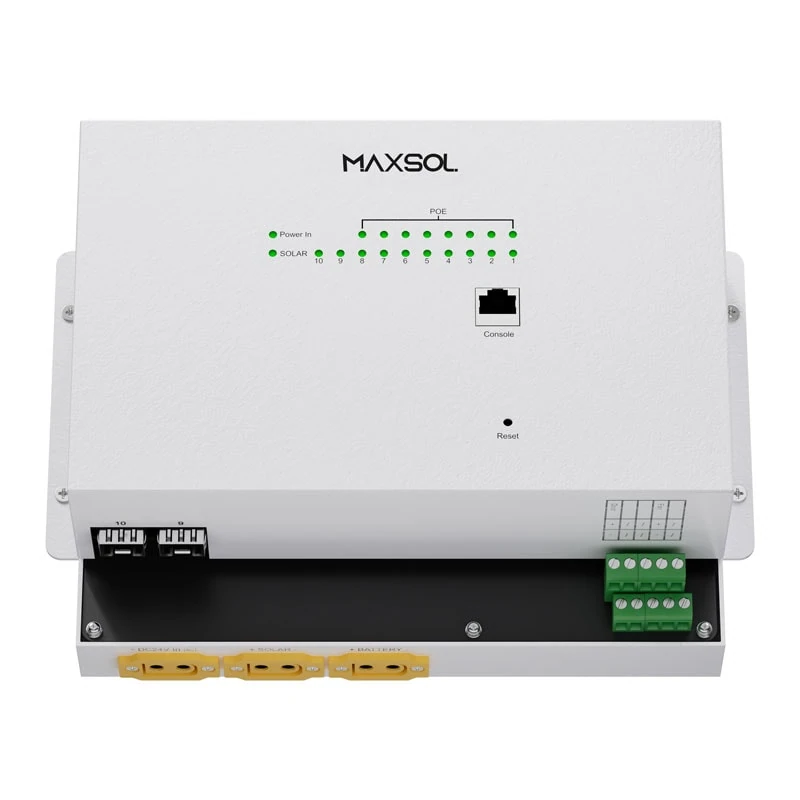
The Maxsol IOT2802SFG-S managed solar industrial PoE switch documents eight Gigabit PoE ports, two SFP ports, a 120W PoE budget, 90W BT support, PV and battery monitoring, and PV and battery input at DC22–29.2V. It also documents configurable 24V or 48V PoE on ports 3–4. Actual port allocation, supplied configuration, charging limits and battery compatibility must be verified against the current datasheet.
These two linked products are alternative architecture examples, not a tested compatible bundle. In particular, a 12.8V battery or DC12V output must not be connected directly to a switch requiring DC22–29.2V.
Possible architecture paths include:
- choosing a switch designed for the battery system’s direct output voltage;
- choosing a battery architecture that stays within the switch’s specified input range;
- using a properly engineered DC-DC stage after verifying input range, output stability, current capacity, efficiency, surge handling, low-voltage behaviour and protection.
Do not select a converter from nominal voltage alone. Camera infrared switching, radio startup and high-power PoE devices can produce changing or momentary demands.
Check simultaneous port loads
The total PoE budget is only one limit. Each device must also match its particular port’s voltage, PoE standard and per-port capacity.
The following is a hypothetical design assumption, not measured product performance:
| Powered device | Quantity | Assumed load per device | Combined load |
|---|---|---|---|
| Fixed IP cameras | 4 | 8W | 32W |
| PTZ camera | 1 | 25W | 25W |
| CPE295 | 1 | 6.5W documented full-load consumption | 6.5W |
| Powered-device total | 63.5W |
This 63.5W figure does not include switch consumption, cable loss, DC conversion loss or temporary startup peaks. It also does not prove that every device is compatible with its intended port. Confirm:
- the PoE mode and standard required by each camera;
- maximum rather than average camera consumption;
- night-time infrared, heater or motor loads;
- per-port output limits;
- total simultaneous PoE capacity;
- cable length, conductor size and voltage drop;
- which ports provide standard PoE and which have configurable output;
- whether the radio is powered by standard PoE or separate DC.
For a fuller method, use the PoE power-budget calculation guide for security cameras rather than sizing from camera quantity alone.
Verify the complete solar electrical path
Before procurement, check the current product documentation for:
- controller PV voltage, current and power limits;
- permitted battery chemistry and nominal voltage;
- charging and discharge temperature limits;
- battery overcurrent and short-circuit protection;
- disconnect thresholds and restart thresholds;
- switch PV and battery input requirements;
- earthing, surge protection and cable protection;
- load-output current limits;
- required fuses or breakers.
Never resolve conflicting source specifications by assumption. Obtain confirmation for the exact hardware revision and supplied configuration.
Plan monitoring, load priority and recovery
Monitoring is valuable only when it helps the operator distinguish between a network problem and an energy problem. Useful data may include battery voltage, charging state, PV input, load status, switch reachability, radio link condition and camera availability.
The IOT2802SFG-S documents PV and battery monitoring, but the required monitoring interfaces, configuration and integration method should be confirmed for the intended deployment. Optional interfaces should not be treated as standard inclusions.
Establish a load-priority policy
A remote site should have a written shutdown order. One practical hierarchy is:
- Control and core networking: the equipment needed to supervise or recover the site.
- Backhaul and critical cameras: devices required for alarms, essential coverage and remote diagnosis.
- Secondary cameras: useful coverage that may be shed under a defined low-energy condition.
- Non-essential loads: auxiliary lighting or other equipment that can be disabled first.
The precise order depends on the security objective. In some deployments, local recording is more important than a continuously active backhaul. In others, remote alarms and live access are essential, making the radio link a high-priority load.
Avoid shutting down the only device capable of restoring the other loads unless an independent controller, timer or automatic recovery process is available.
Prevent brownout reboot loops
A weak battery can cause this cycle:
- Voltage falls and equipment switches off.
- Removing the load allows battery voltage to recover slightly.
- Equipment restarts.
- Startup demand causes voltage to fall again.
- The cycle repeats until charging becomes sufficient or protection latches off.
Repeated rebooting can interrupt recording and leave radios, switches or cameras in an uncertain state. The design should therefore use:
- appropriate low-voltage disconnect settings;
- a restart threshold sufficiently above the shutdown threshold;
- a restart delay after charging resumes;
- staged restoration of loads;
- prioritised port activation where supported;
- enough reserve for simultaneous startup;
- local recovery logic that does not depend entirely on the wireless link.
Managed switching may assist with visibility, VLAN separation, device control and fault diagnosis, but features differ by model and firmware. Review the comparison of managed and unmanaged PoE switches before deciding whether those functions justify the added configuration work at a remote site.
Validate night operation and restart behaviour
Daytime commissioning can hide energy and infrared-load problems. Acceptance testing should include night operation, interrupted charging and a controlled restart.
All numerical test levels and durations should be based on the project’s documented assumptions; there is no universal runtime that applies to every off-grid CCTV system.
Recommended commissioning sequence
-
Verify documentation and wiring
Confirm battery chemistry, polarity, voltage ranges, controller limits, PoE port allocation, protection devices and cable labelling before energising the system. -
Power devices individually
Connect the switch, cameras and radio in stages. Record each device’s normal startup behaviour and confirm that it appears on the intended network and VLAN. -
Apply all simultaneous loads
Operate all required cameras, wireless equipment and auxiliary loads together. Activate camera infrared illumination, PTZ movement and other high-load modes where applicable. -
Test the complete video path
Confirm local recording, central recording, live viewing, event traffic and management access. Test multiple simultaneous streams rather than one camera at a time. -
Measure the wireless link under real traffic
Check both directions of the bridge while carrying the expected camera load. Record signal and throughput indicators available from the equipment, but do not treat a short installation test as a guarantee of long-term performance. -
Observe operation after sunset
Confirm that camera power increases do not overload a port, destabilise the switch or cause a battery-side voltage drop beyond the designed limits. -
Simulate loss of charging input
In a controlled manner, verify alarms, load shedding and low-voltage shutdown. Do not deliberately over-discharge the battery or bypass protective controls. -
Test recovery from full network shutdown
Restore charging or the approved power source and observe the restart sequence. Confirm that the switch, critical cameras and both wireless endpoints reconnect without manual intervention where automatic recovery is required. -
Interrupt the backhaul separately
Confirm what cameras do when the radio link fails. Local recording, event buffering and time synchronisation behaviour should match the project requirements. -
Document the accepted configuration
Save switch, camera and radio settings, port assignments, IP addresses, firmware versions and recovery procedures.
Handover and maintenance checklist
A maintainable installation needs more than a topology drawing. Give the owner or maintenance team enough information to diagnose power, network and wireless faults without guessing.
Design and compatibility
- Required cameras and network services are listed.
- Critical and shed-able loads are identified.
- Battery voltage matches the complete power path.
- Switch input range is verified.
- Controller PV and charging limits are confirmed.
- Every powered device matches its assigned port interface.
- Maximum simultaneous PoE load has been calculated.
- Switch overhead, cable loss and DC conversion loss are included separately.
- Both ends of the wireless backhaul have suitable power.
- Linked products are not assumed to form a validated bundle.
Network and wireless configuration
- IP address plan and VLAN assignments are recorded.
- Required camera streams have been tested concurrently.
- Backhaul capacity is evaluated using application traffic.
- Line of sight and mounting alignment are checked.
- Local interference and radio requirements are considered.
- Recorder and camera behaviour during a link outage is documented.
- Passwords and administrative access are handed over securely.
- Configuration backups are stored in an agreed location.
Power, monitoring and recovery
- Low-battery alarms and shutdown thresholds are documented.
- Load-shedding order is confirmed.
- Restart thresholds and delays have been tested.
- Simultaneous startup does not destabilise the power system.
- Monitoring data remains available for as long as required.
- The recovery process works without remote connectivity where necessary.
- Manual reset procedures are clearly explained.
Physical maintenance
- Solar-panel condition, shading and mounting are included in inspections.
- Battery, controller and switch enclosures are checked for moisture, heat and cable-entry issues.
- Terminals, fuses, breakers, earthing and surge protection are inspected.
- Outdoor Ethernet and power cables are checked for damage or water entry.
- Camera and CPE alignment remains secure.
- Battery condition is assessed using the battery supplier’s approved method.
- Maintenance staff know which readings indicate an energy fault, radio fault or PoE fault.
Common design questions
Can a 12.8V solar battery directly power a 22–29.2V switch?
No. A 12.8V battery or 12V controller output is not a direct compatible supply for equipment requiring DC22–29.2V. Use a correctly matched battery architecture, a switch with an appropriate input range, or an engineered conversion stage that has been fully verified.
Does a 120W PoE budget mean the solar panel should also be 120W?
No. A switch’s PoE budget describes its available output to powered devices under specified conditions. Solar-array sizing must also account for daily energy consumption, charging opportunity, system losses, battery requirements and environmental conditions. Identical wattage labels do not establish an energy balance.
Does nominal battery capacity guarantee overnight runtime?
No. Nominal watt-hours are not the same as usable delivered energy. Actual runtime depends on load profile, discharge limits, temperature, battery condition, controller settings and conversion losses. It should be validated against the project’s required night operation and recovery conditions.
Does a wireless distance label guarantee CCTV performance?
No. Link distance and rate labels do not guarantee application throughput. Terrain, line of sight, Fresnel clearance, antenna alignment, interference, channel configuration and local radio requirements all affect the result. Validate the bridge while carrying the expected concurrent video traffic.
As a practical next step, compare the linked Maxsol selection examples against your required port count, maximum simultaneous load, link distance, input voltage, battery architecture, installation environment and management functions. Confirm the latest datasheets and exact supplied configurations before treating any switch, solar system and wireless CPE as a compatible design.