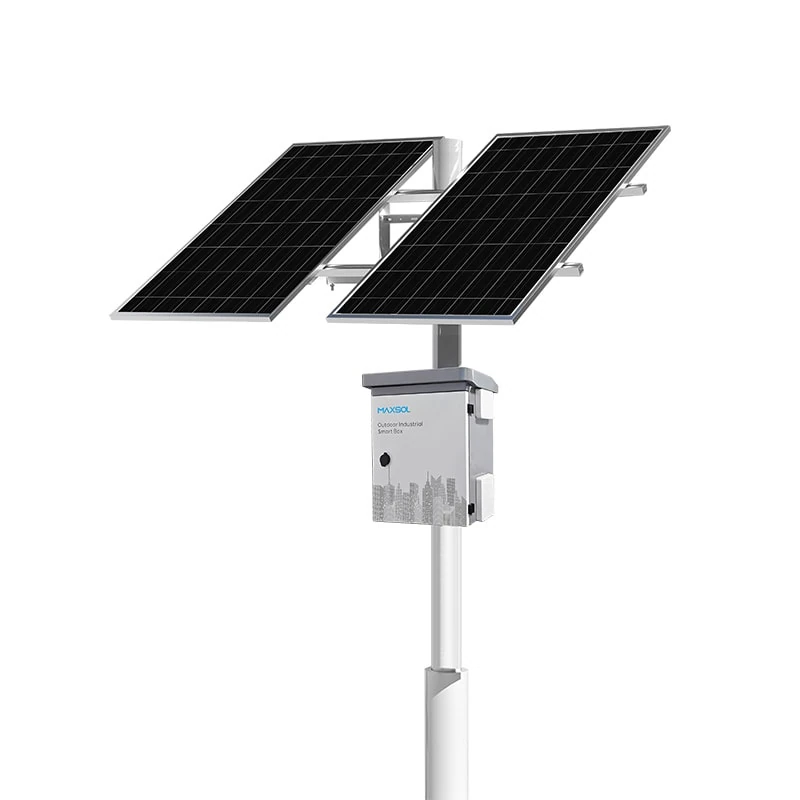
Solar Security Cameras for Farms, Car Parks and Remote Sites
Compare solar security camera needs for Malaysian farms, car parks and remote facilities, including power, wireless links, mounting and upkeep.
By Maxsol Team

Solar-powered security cameras can serve farms, car parks and remote facilities where grid power or wired networking is impractical. However, these sites should not use the same design by default: farms face vegetation and dispersed coverage, car parks need clear identification at entrances and across open areas, while remote facilities demand longer autonomy and simpler maintenance.
When specifying solar powered security cameras for farms, parking lots and remote facilities, begin with measured camera and network loads, required operating hours, mounting conditions, connectivity and acceptable downtime. The solar power and wireless networking products discussed below do not provide camera imaging, recording or video analytics; those functions must be selected and verified separately.
Farm boundaries and agricultural buildings
Farm surveillance often covers a mixture of gates, boundary roads, machinery areas, stores and livestock buildings. These targets may be spread across a large property rather than concentrated around one building.
The first design decision is whether each location needs continuous video, event-triggered recording or periodic viewing. Continuous transmission normally creates a different power and network requirement from a camera that records locally and sends only alerts or selected clips.
Coverage changes with the landscape
Trees, crops and buildings can block both the camera view and the wireless path. Conditions may also change after installation as vegetation grows or farming activities move equipment into the line of sight.
A farm site survey should therefore document:
- The specific gate, path, wall or building to be observed
- The required identification distance and field of view
- Seasonal vegetation that could shade a panel or block a wireless link
- Movement of tractors, lorries and other tall machinery
- Locations suitable for secure poles or building mounts
- Whether livestock could reach cables, boxes or support structures
A camera may need to face a shaded entrance while its solar panel needs an unobstructed position. Do not assume both devices should be fixed to the same side of a pole. Separate brackets or a nearby panel position may deliver a better result, provided the cable run and voltage drop remain acceptable.
Connectivity across dispersed areas
Running fibre or copper to distant farm boundaries may be difficult. A directional wireless bridge can be considered where there is a clear path back to a building or network point, but advertised range labels are not evidence of usable throughput at a particular site.
Confirm line of sight, mounting height, interference, alignment stability and obstructions. Trees are especially important because a path that appears open during installation may become restricted as foliage develops.
Parking entrances and open car parks
Car park surveillance typically has more concentrated activity than a farm boundary. The priority may include entrance and exit lanes, payment or access points, pedestrian routes, vehicle rows and perimeter areas.
Entrances usually require more deliberate camera placement than general overview areas. A wide overview may show vehicle movement but may not provide the detail required for identification. Camera imaging capability, lens selection, shutter behaviour and lighting performance remain camera-specific matters and are not determined by the solar power system.
Shade and mounting require separate checks
Open car parks may appear ideal for solar generation, but the intended mounting position can still be affected by:
- Nearby buildings or covered walkways
- Trees and landscaping
- Signboards, gantries or roof structures
- Future construction or additional parking shelters
- Lighting poles that are unsuitable for added wind or equipment loads
Existing lighting poles should not automatically be treated as camera and solar supports. Confirm structural suitability, available mounting space, cable routing, maintenance access and permission from the asset owner.
The panel orientation should be selected for solar exposure, while the camera should be positioned for the required scene. Compromising both devices to fit one convenient bracket can reduce system effectiveness.
Network traffic may be less predictable
A car park may use several cameras around a single entrance or coverage zone. This affects port count, aggregate bandwidth and power consumption. Night-time operation can also change the camera load when infrared illumination, white light or other camera features activate.
Wireless performance should be checked during busy periods, not only when the car park is quiet. Vehicles, nearby wireless networks and physical structures may alter the practical link quality. Where video is recorded locally, determine how much live viewing, playback and remote retrieval the wireless connection must support.
Remote facilities with limited service access
Remote facilities may include utility compounds, isolated equipment sites, storage areas, water infrastructure or unattended technical installations. Their defining issue is not simply distance from the grid; it is the time, cost and difficulty involved in reaching the site when something fails.
These deployments generally need greater design margin and better monitoring than an easily accessible farm building or urban car park. A system that requires frequent manual resets or cleaning may be unsuitable even if its initial power calculation appears adequate.
Autonomy should reflect service constraints
Autonomy means how long the system can continue operating when solar input is poor, but nominal battery capacity alone does not establish this period. Usable delivered energy depends on the complete system, including controller behaviour, battery protection, operating temperature, cable losses, conversion losses and permitted depth of discharge.
Remote-site planning should define:
- Maximum acceptable interruption period
- Expected load in normal, night and fault modes
- Whether non-critical equipment can be shut down
- How low battery or charging faults will be reported
- Whether the equipment can be restarted remotely
- How quickly a technician can realistically attend
- Which spare parts and tools must be brought on the first visit
Do not promise 24/7 operation solely from panel wattage and nominal battery Wh. Solar conditions vary, and the current datasheet and supplied configuration must be checked for controller limits, charging temperatures and protection behaviour.
Serviceability matters as much as capacity
Cabinets, connectors and protective devices should be positioned so a technician can inspect them safely. Labels should remain readable, and replaceable components should not require unnecessary dismantling.
For exposed equipment, enclosure ratings address different risks. IP ratings concern ingress protection, while IK ratings concern mechanical impact resistance. The distinction is explained further in this guide to IP65 and IK10 considerations for outdoor CCTV enclosures.
Compare power, connectivity and mounting needs
The following matrix summarises the differences. It is a planning guide rather than a substitute for site measurements.
| Requirement | Farm boundaries and buildings | Parking entrances and open car parks | Remote facilities |
|---|---|---|---|
| Coverage | Dispersed gates, roads, stores and work areas | Concentrated entrances plus wide-area overviews | Specific equipment, perimeter or access points |
| Shade risks | Trees, crops, roofs and changing vegetation | Buildings, landscaping, shelters and sign structures | Terrain, structures and limited choice of mounting position |
| Mounting | Poles, fences or agricultural buildings; protect equipment from machinery and animals | Lighting poles, dedicated poles, gantries or structures subject to owner approval | Secure, serviceable mounts designed for unattended exposure |
| Connectivity | Long links between scattered locations; vegetation can obstruct wireless paths | Multiple cameras may share a higher-traffic connection | Backhaul may be distant, intermittent or difficult to align and repair |
| Autonomy priority | Depends on recording mode and ease of farm access | Usually balanced against concentrated camera and network loads | High priority where service visits are slow or costly |
| Service access | Often accessible during operating hours but spread across a large property | Generally easier, but work may disrupt traffic or require access control | Limited access makes remote monitoring, documentation and spare planning important |
| Common design mistake | Ignoring seasonal shade and foliage growth | Using one mounting angle for both panel and camera | Selecting from nominal battery Wh without defining acceptable downtime |
The matrix also shows why equipment should not be selected solely by site category. Two farm gates can have very different loads and shade conditions, while a small remote facility may need more autonomy than a much larger car park installation.
Select components by measured requirements
Component selection should follow a measured load schedule and site survey. Start with the camera, recorder or edge device, wireless equipment, switch and any cabinet loads. Record their input voltage, typical consumption, maximum consumption and operating schedule.
For each device, calculate daily energy using:
Daily energy in Wh = power in W × operating hours
Where consumption changes between modes, calculate each period separately. Include day and night behaviour, wireless transmission, heaters or illuminators if present, and any equipment that remains active when the camera is not transmitting.
For a structured calculation process, refer to this guide on sizing an off-grid solar power system for CCTV. The result should be treated as an engineering input, not as a guaranteed runtime.
Hypothetical calculation example
The following figures are hypothetical assumptions for explaining the method; they are not measured product performance.
Assume one camera averages 8W over 24 hours and an associated network device consumes 6.5W continuously:
- Camera: 8W × 24 hours = 192Wh per day
- Network device: 6.5W × 24 hours = 156Wh per day
- Hypothetical base load: 348Wh per day
This total still excludes cable losses, controller consumption, conversion losses, changing camera modes and design margin. It also does not establish how much solar input will be available at the site. Measure the actual equipment where possible and size for the agreed operating requirement.
Power-system selection examples
The Maxsol CS12060 120W and 768Wh solar power system documents a 120W monocrystalline panel, 12.8V 60Ah 768Wh LiFePO4 battery, MPPT controller and three DC12V outputs. RS485 is optional. These specifications can be compared with a measured low-voltage load, but 768Wh is nominal battery energy rather than guaranteed usable energy or runtime.
For higher measured energy demand, the Maxsol CS400150 400W and 1920Wh solar power system documents two 200W panel modules, a 12.8V 150Ah 1920Wh LiFePO4 battery, MPPT control and four DC12V outputs.
Before selecting either example, verify:
- The voltage accepted by every connected device
- Starting, peak and night-mode loads
- Connector type, polarity and cable size
- Voltage drop over the planned cable distance
- Number of independently required outputs
- Controller PV voltage, current and power limits
- Battery charging-temperature limits and protection
- The exact datasheet and supplied configuration
These power systems do not include or replace camera imaging, recording or analytics. They are also selection examples, not evidence of a tested compatible bundle with any particular camera or radio.
Wireless-link selection example
The Maxsol CPE295 5.8GHz directional wireless CPE documents a 2×2 14dBi directional MIMO antenna, one Gigabit LAN port, IEEE 802.3af/at or 9–48V DC power support and 6.5W full-load consumption.
Its power-input options must not be confused with the DC12V outputs documented for the solar systems. Confirm the selected powering method, any required injector or conversion equipment, polarity and total energy demand.
A product range label does not guarantee site distance or application throughput. Verify:
- Clear line of sight, including future vegetation
- Fresnel-zone obstruction risk
- Local 5.8GHz interference
- Mounting height and bracket stability
- Required real application throughput
- Compatibility with peer equipment and network topology
- Local radio rules
- Surge, earthing and cable protection requirements
For multiple cameras, one Gigabit LAN port does not by itself provide the required local port count. The complete topology may require a suitable switch, and its consumption must be included in the solar load.
Prepare a requirements handover
A good handover allows procurement, installers and commissioning teams to work from the same assumptions. It should include:
| Handover item | Required information |
|---|---|
| Surveillance objective | Scene to be covered and whether overview, detection or identification is needed |
| Camera schedule | Quantity, voltage, normal and maximum power, day/night mode and recording method |
| Network requirement | Port count, bandwidth, latency tolerance, topology and management needs |
| Solar survey | Panel position, shading observations, cable route and structural constraints |
| Autonomy target | Acceptable downtime and required operation during low solar input |
| Wireless survey | Endpoints, line of sight, interference findings, mounting heights and expected traffic |
| Environmental conditions | Exposure to rain, heat, humidity, dust, corrosion, impact and vegetation |
| Maintenance plan | Inspection interval, cleaning access, fault alerts, spares and travel constraints |
| Acceptance criteria | Power, network, video, enclosure and documentation tests required before sign-off |
Avoid vague entries such as “long range”, “full coverage” or “several days”. Replace them with measurable acceptance criteria wherever the project team has enough information.
Plan maintenance and acceptance checks
Solar camera sites still require planned maintenance. Panels can become shaded or dirty, mounts can shift, vegetation can enter the camera view, and wireless alignment can deteriorate. Maintenance frequency should follow the site environment and observed condition rather than an unsupported universal interval.
A practical inspection checklist includes:
- Remove obstructions from the panel without damaging its surface
- Check for new shade at different times of day
- Inspect brackets, poles and fasteners for movement or deterioration
- Examine cables, glands, connectors and seals
- Confirm cabinet drainage and signs of moisture ingress
- Review controller, battery and network fault records where available
- Check camera view, focus and night-time image behaviour
- Verify wireless signal and application throughput
- Confirm labels and as-built drawings remain accurate
- Record any load or configuration changes
Acceptance testing before handover
Commissioning should test the complete operating chain rather than only confirming that the camera turns on. Recommended checks include:
- Power test: Measure normal, maximum and night-mode demand at the intended operating voltage.
- Charging check: Confirm the controller recognises the supplied PV and battery configuration without exceeding documented limits.
- Voltage-drop test: Measure voltage at the load under realistic demand.
- Network test: Check link stability, packet loss and usable throughput while carrying representative camera traffic.
- Video test: Confirm the selected camera meets the project’s daytime and night-time scene requirements.
- Mounting inspection: Verify alignment, fasteners, cable support and safe service access.
- Fault test: Confirm agreed alerts and recovery behaviour for loss of power or connectivity.
- Documentation check: Provide settings, device locations, cable routes, credentials process, test results and maintenance responsibilities.
Weather during commissioning may not represent prolonged low-solar conditions. State this limitation in the acceptance record rather than claiming guaranteed autonomy from a short observation period.
The next step is to compare the linked Maxsol power and wireless examples against the project’s measured port count, load, distance, power interface, environment and management requirements. Confirm current datasheets and supplied configurations before treating any models as compatible parts of the same system.